Most months have one mood. July has two side summers and Q3. You want to enjoy it, but you cannot lose four weeks of momentum when the second half of the year is just starting.
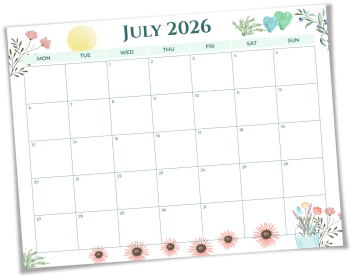
A generic calendar cannot hold both. PlanWiz July 2026 calendar planner templates are built around this exact tension. Choose from:
- Monthly overview: Every commitment is mapped before chaos starts
- Goal + calendar hybrid: Mid-year targets sit alongside daily dates, forcing you to connect what you want with what you actually schedule
- Family coordination view: One shared layout for everyone's July, no more group-chat confusion
- Minimal grid: Clean and open for people who just need space to write
How to Plan Your Entire July in Under 20 Minutes Using July 2026 Calendar Planner Templates?
Most people open a new planner with good intentions and stall within two days. Not because they lack discipline, but because they started without a system. Here is a 4-step setup that takes under 20 minutes and makes the whole month stick.
- Step 1: Drop in fixed dates first. The best July start planners begin here, add everything already confirmed: holidays, travel, appointments, and deadlines. These are your anchors. Build everything else around them.
- Step 2: Set two non-negotiable July goals. One professional, one personal. Write them at the top of your monthly view where you see them every day.
- Step 3: Pick three weekly priorities every Monday. Choose three things that must happen that week. Add them to your daily rows and leave breathing room. A realistic planner gets used; an overpacked one gets abandoned.
- Step 4: Do a five-minute Friday review. Check what moved and what did not. Shift unfinished tasks forward. This one habit separates people who finish July feeling ahead from those who feel it has disappeared.
Why July 2026 Calendar Planner Templates From PlanWiz Actually Stick?
Most free calendars give you a grid and nothing else. No goal structure, no priority rows, just dates. That is why they get used for a week and forgotten.
PlanWiz July 2026 calendar planner templates are built differently:
- Goals live inside the layout: Your targets sit directly alongside your dates, so your July 2026 planner always keeps what you want and what you scheduled in the same view.
- Fully editable sections: Every label, row, and time block in the customizable July planner adjusts to your schedule, your subjects, and your family; nothing is locked.
- Reusable week to week: Duplicate any layout, update the content, and continue. No reformatting. No starting over mid-month.
- Works on any device: Plan from your phone on a Monday morning or your laptop on Sunday night. Your July planner goes wherever July takes you.
- Print-ready on demand: Every template prints cleanly on standard paper, ready for a wall, a notebook, or a fridge door.
- Free to start: Access july 2026 calendar planner templates instantly. No credit card, no trial, no subscription wall between you and your plan.
Frequently Asked Questions
Q-1. Who gets the most out of july 2026 calendar planner templates?Working professionals hitting Q3 targets, parents managing summer family schedules, and students staying productive through an unstructured month, anyone who needs one system for both personal and work life.
Q-2. What is the difference between a monthly and a daily layout?The monthly view shows the full picture of conflicts, free space, and goals at a glance. Daily view goes deeper into how each day is spent. Most users run both: monthly for direction, daily for execution.
Q-3. Can I share my planner with a partner or colleague?Yes. PlanWiz templates can be shared digitally so others can view or edit the same plan, useful for family trip coordination or shared Q3 work projects.
Q-4. How do I stay consistent and not abandon the planner after week one? Keep it simple. Only fill in what you will realistically use. The Friday five-minute review in Section 2 is the most effective consistency habit it takes less time than a coffee break and keeps the whole month from slipping.
Q-5. Can I use one template for both work tasks and personal events?Yes. The goal and calendar hybrid layout in the July 2026 planner is designed for exactly this: separate rows for professional priorities and personal commitments, so both stay visible without getting mixed together.