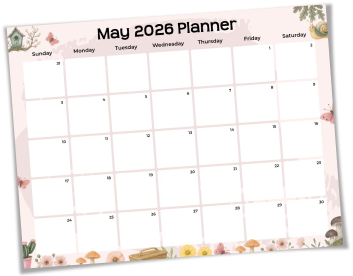
A regular calendar tells you the date. A planner template tells you what to do with it. Most people who struggle in May are not disorganized; they just have no single place where their work targets, family schedule, and personal goals live together. That gap is exactly what may 2026 calendar planner templates are built to close.
PlanWiz templates go beyond dates. Each layout includes sections for monthly priorities, weekly task blocks, and a notes area so you stop bouncing between three apps just to figure out your Tuesday. Whether you need an editable may calendar planner for your desktop or a printed sheet on your fridge, both are available, and both are free. The result is a month where nothing gets missed and no week catches you off guard.
How to Set Up Your May 2026 Calendar Planner Templates?
Most people open a planner on May 1st already behind. Setting it up in the last week of April changes everything. Here is how to do it right:
- Step 1: Pick the right format first. If you manage multiple roles, work, parenting, and personal goals, choose the monthly overview. If you run deadline-heavy weeks, the weekly breakdown gives you more control.
- Step 2: Enter your non-negotiables. School events, standing meetings, bill dates, and known deadlines go in first. These are your anchors. Everything else fits around them.
- Step 3: Name your top three May goals. Not a task list, three outcomes you want by May 31st. Write one in the first week, one in the third week, and one at the end. This stops the month from filling up with urgency and leaving no room for what actually matters.
- Step 4: Block your recovery days. May has a way of compressing. Deliberately leave two or three days with lighter loads so you can absorb whatever moves. A customizable may planner lets you mark these visually so they do not disappear.
- Step 5: Choose print or digital. Download the May calendar planner printable as a PDF for your desk or wall. Or use PlanWiz on your phone and tablet if your planning happens on the go. Either way, your template is ready in under a minute.
Why May 2026 Calendar Planner Templates Work Better for Busy People?
The reason most planners get abandoned by week two is that they were designed for ideal conditions, not real ones. May is not an ideal month. It is loud, layered, and fast.
May 2026 calendar planner templates are built for that reality. The layouts assume you have a job, a family, and goals that compete for the same 24 hours. Nothing is locked or over-structured. Every section adjusts to how you actually think, not how a productivity blog tells you to.
That is also why the May calendar planner template here works across different people. A working parent uses it to see school pickups and project deadlines on the same page. A student uses it to spread exam prep across four weeks instead of cramming in two days. A freelancer uses it to protect deep work time before client requests eat the whole month.
Frequently Asked Questions
Q-1. Why use a planner template instead of a regular calendar?A regular calendar shows dates. A May 2026 calendar planner template gives you space for priorities, tasks, and events so you plan the month, not just watch it pass.
Q-2. Can one may calendar planner template handle both work and family schedules?Yes. The editable may calendar planner holds professional and personal commitments on the same page, no switching tools, no double-booking.
Q-3. How do I actually stick to my plan through all 31 days of May?Keep the template visible on your desk or wall. Every Sunday, spend five minutes reviewing the week ahead and adjusting. Consistency comes from reviewing regularly, not just planning once.
Q-4. Can a student use this template for exam planning in May?Yes. Map your subjects across May's four weeks, assign specific topics to each day, and use the notes section to flag what still needs revision before exam day.
Q-5. Can freelancers track client deadlines inside this template?Yes. Add a client column to your weekly layout and map deliverables by date; every deadline stays visible, so nothing slips between projects.
Q-6. How is PlanWiz different from just using a Google Calendar?Google Calendar manages time slots. A customizable may planner gives you space for goals, priorities, and notes in one visual layout, planning and scheduling in a single place.